- Home
- Purchase
- Developer Tools
- BarCode Generator SDK
- BarCode Generator SDK for Javascript for Code 128
- BarCode Reader SDK
- PDF Generator SDK for Javascript
- PDF Extractor SDK
- PDF Renderer SDK
- PDF To HTML SDK
- PDF Viewer SDK
- Spreadsheet SDK
- Image To Video SDK
- Screen Video Capturing SDK
- SWF To Video and Images SDK
- Images Watermarking SDK
- Document SDK beta
- Misc Tools
- Desktop Utilities
- Download
- Support
- Company
The PDF SDK for .NET product has been acquired by Sybrex company in January, 2011 and not available on our web-site anymore.
NEW: Check our new rich PDF reports generator for Javascript (completely client side generation): PDF Generator SDK for Javascript: click here to read more details...
For 3rd party server side C# open-source PDF generation library?
Check the blog article: .NET Bear, Do You Know Any Free PDF Generation Libraries For Use In Commercial Applications?
Our commercial products for PDF format:
PDF Extractor SDK - extract tables, text, structured data from PDF files in your apps
PDF Renderer SDK - render PDF files to PNG, BMP, TIFF images in your apps
PDF To HTML SDK - convert PDF to HTML with images and formatting preserved
How to add load text font from font name for use in PDF document made with Bytescout.PDF library for .NET
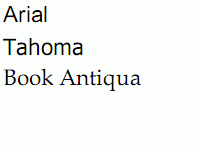
Adding font using its name into PDF document
This example demonstrates how to add and use text font using its name (the library looks for fonts installed in system, you can also load fonts from file - see sample) and use this font for text. You can also use built-in PDF fonts (see sample)

Download example source code: bytescoutpdf_fonts_from_font_name_non_standard_fonts.zip (25 KB)
using System;
using System.Collections.Generic;
using System.Text;
using Bytescout.PDF;
using System.Diagnostics;
namespace HelloWorld
{
class Program
{
static void Main(string[] args)
{
// Create main PDF Doc Engine
PDFDocEngine engine = new PDFDocEngine("", "");
// Add new document
Document document = engine.AddDocument();
// Append new page to the document
Page page = document.AddPage(PageSizeType.A3, PageOrientationType.LandScape);
// Create new drawing
Drawing drawing = page.AddDrawing();
// font size constant
const int fontSize = 50;
// Create array with font types
string[] fontNames = new string[] {
"Arial",
"Tahoma",
"Book Antiqua"
};
// X position of the text to draw
int textX = 10;
// Y position of the text to draw
int textY = 50;
// Draw all font types
foreach (string fontName in fontNames)
{
// Add standard font
uint font = document.AddFontTrueType(fontName, false, false);
// Set Active Font
drawing.SetActiveFont(font, fontSize, false, false);
// Draw Text
drawing.PlaceText(textX, textY, 0, fontName);
// Increase position of the next text
textY += fontSize + 20;
}
// Save document
document.Save("FontsFromFontName.pdf");
// open generated PDF document in default PDF viewer installed in Windows
Process.Start("FontsFromFontName.pdf");
}
}
}
Download example source code: bytescoutpdf_fonts_from_font_name_non_standard_fonts.zip (25 KB)
Filed in:
PDF SDK for .NET
Tutorials: