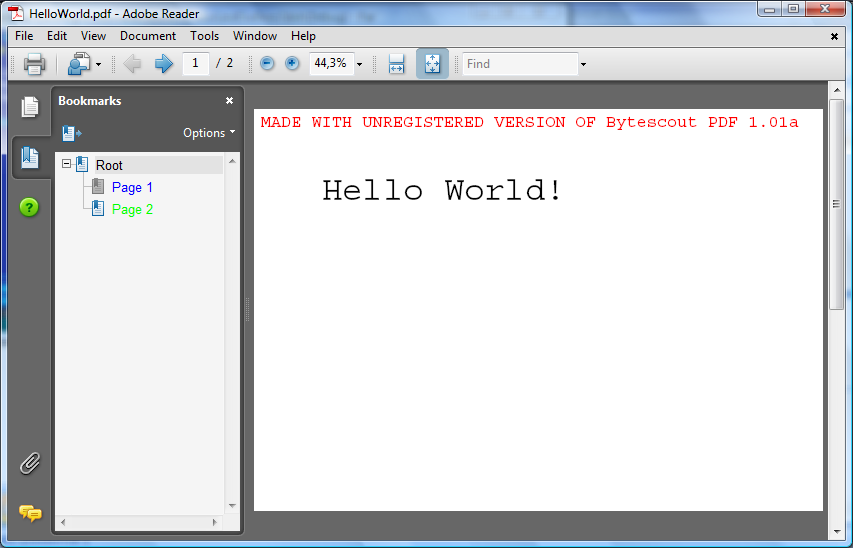
How to use different colors for outlines in bookmarks in PDF document
This example teaches how to mark outlines with different colors in bookmarks tree in PDF document generated by ByteScout PDF SDK

Program.vb:
VB
'*******************************************************************
' ByteScout PDF SDK
'
' Copyright © 2016 Bytescout, https://bytescout.com
' ALL RIGHTS RESERVED
'
'*******************************************************************
Imports Bytescout.PDF
''' <summary>
''' This example demonstrates how to create document outlines (bookmarks).
''' </summary>
Class Program
Shared Sub Main()
' Create new document
Dim pdfDocument = New Document()
pdfDocument.RegistrationName = "demo"
pdfDocument.RegistrationKey = "demo"
Dim font = New Font(StandardFonts.Times, 18)
Dim brush = New SolidBrush()
' Create pages
For i As Integer = 0 To 2
Dim page = New Page(PaperFormat.A4)
page.Canvas.DrawString(String.Format("Page {0}", i + 1), font, brush, 20, 20)
pdfDocument.Pages.Add(page)
Next
' Create outlines:
Dim destination1 = New Destination(pdfDocument.Pages(0))
Dim outline1 = New Outline("Page 1", destination1)
pdfDocument.Outlines.Add(outline1)
' Example of sub-bookmark
Dim destination2 = New Destination(pdfDocument.Pages(1))
Dim outline2 = New Outline("Page 2", destination2)
pdfDocument.Outlines(0).Kids.Add(outline2)
Dim destination3 = New Destination(pdfDocument.Pages(2))
Dim outline3 = New Outline("Page 3", destination3)
pdfDocument.Outlines.Add(outline3)
' Force PDF viewer to show Bookmarks panel at start up.
pdfDocument.PageMode = PageMode.Outlines
' Save document to file
pdfDocument.Save("result.pdf")
' Cleanup
pdfDocument.Dispose()
' Open document in default PDF viewer app
Process.Start("result.pdf")
End Sub
End Class
Program.cs:
C#
//*******************************************************************
// ByteScout PDF SDK
//
// Copyright © 2016 ByteScout - https://bytescout.com
// ALL RIGHTS RESERVED
//
//*******************************************************************
using System.CodeDom;
using System.Diagnostics;
using Bytescout.PDF;
namespace Bookmarks
{
/// <summary>
/// This example demonstrates how to create document outlines (bookmarks).
/// </summary>
class Program
{
static void Main()
{
// Create new document
Document pdfDocument = new Document();
pdfDocument.RegistrationName = "demo";
pdfDocument.RegistrationKey = "demo";
Font font = new Font(StandardFonts.Times, 18);
Brush brush = new SolidBrush();
// Create pages
for (int i = 0; i < 3; i++)
{
Page page = new Page(PaperFormat.A4);
page.Canvas.DrawString(string.Format("Page {0}", i + 1), font, brush, 20, 20);
pdfDocument.Pages.Add(page);
}
// Create outlines:
Destination destination1 = new Destination(pdfDocument.Pages[0]);
Outline outline1 = new Outline("Page 1", destination1);
pdfDocument.Outlines.Add(outline1);
// Example of sub-bookmark
Destination destination2 = new Destination(pdfDocument.Pages[1]);
Outline outline2 = new Outline("Page 2", destination2);
pdfDocument.Outlines[0].Kids.Add(outline2);
Destination destination3 = new Destination(pdfDocument.Pages[2]);
Outline outline3 = new Outline("Page 3", destination3);
pdfDocument.Outlines.Add(outline3);
// Force PDF viewer to show Bookmarks panel at start up.
pdfDocument.PageMode = PageMode.Outlines;
// Save document to file
pdfDocument.Save("result.pdf");
// Cleanup
pdfDocument.Dispose();
// Open document in default PDF viewer app
Process.Start("result.pdf");
}
}
}