
The following samples demonstrate how to add barcode to existing PDF document with Bytescout BarCode Generator SDK.
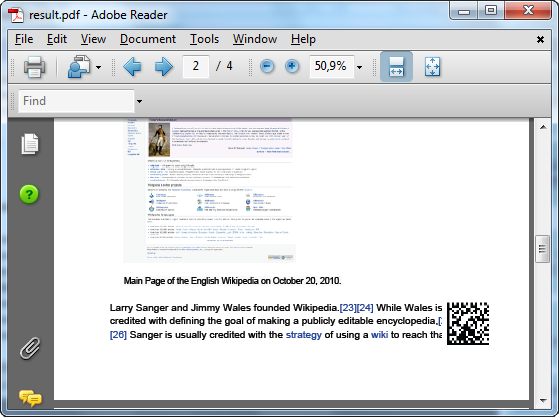
using Bytescout.BarCode;

namespace AddBarcodeToPdfDocument
{
	class Program
	{
		static void Main()
		{
            // Create new barcode and register it.
            Barcode barcode = new Barcode();
			barcode.RegistrationName = "demo";
			barcode.RegistrationKey = "demo";

            // Set symbology
            barcode.Symbology = SymbologyType.DataMatrix;
            // Set value
            barcode.Value = "Sample barcode";

			// Place barcode at bottom-right corner of every document page
			barcode.DrawToPDF("wikipedia.pdf", -1, 500, 50, "result.pdf");

            // Open output file in default PDF viewer
            System.Diagnostics.Process.Start("result.pdf");
		}
	}
}
Imports Bytescout.BarCode

Class Program
	Friend Shared Sub Main()
		' Create new barcode and register it.
		Dim barcode As New Barcode()
		barcode.RegistrationName = "demo"
		barcode.RegistrationKey = "demo"

		' Set symbology
		barcode.Symbology = SymbologyType.DataMatrix
		' Set value
		barcode.Value = "Sample barcode"

		' Place barcode at bottom-right corner of every document page
		barcode.DrawToPDF("wikipedia.pdf", -1, 500, 50, "result.pdf")

		' Open output file in default PDF viewer
		System.Diagnostics.Process.Start("result.pdf")
	End Sub
End Class
' Create barcode object and register it
Set barcode = CreateObject("Bytescout.BarCode.Barcode")
barcode.RegistrationName = "demo"
barcode.RegistrationKey = "demo"

' set symbology to DataMatrix
barcode.Symbology = 15 ' 15 = DataMatrix symbology type

' set barcode value to encode
barcode.Value = "Sample barcode"

' Place barcode at bottom-right corner of every document page
barcode.DrawToPDF "..wikipedia.pdf", -1, 500, 50, "result.pdf"

' Open the output file in default PDF viewer.
Set shell = CreateObject("WScript.Shell")
shell.Run "result.pdf", 1, false
Set shell = Nothing

Set barcode = Nothing