
BarCode Reader SDK and BarCode Reader free utility are capable of reading 1D and 2D barcodes from images fetched from a scanner or a web camera device.
DEVELOPERS: To load image from web-camera or scanner device into BarCode Reader SDK please use freeware Scan SDK (visit this page for free download). Scroll to the end of this tutorial to see ready-to-use source code snippets.
You can test how it works with BarCode Reader utility included into BarCode Reader SDK: run it, use Acquire Image button to load image from web-camera or scanner device.
Requirements for Web-Camera Devices:
Ability to change the focus (in MANUAL FOCUS mode). Usually such web camera devices have a ring around lenses which can be used to adjust the focus. Web camera devices with ability to change focus: Microsoft LifeCam VX-1000, Logitech QuickCam Pro 9000, Labtec Webcam 2200 and any other with manual focus support.
Why it’s important to have Manual Focus in a Web Camera? Manual focus is required to get sharp image of the barcode. With autofocus web camera devices usually are not able to take sharp photo of the barcode.
STEP-BY-STEP TUTORIAL (for cheap Hercules Classic Link webcam)
Run BarCode Reader utility
Turn on web camera
Click Acquire Image
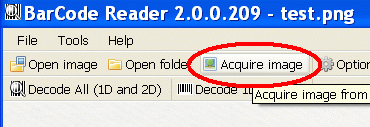
Web camera selection dialog will appear:
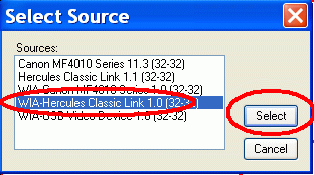
Select WIA-Hercules Classic Link and click Select.
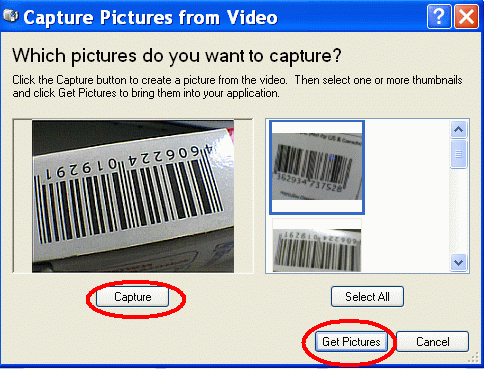
Capture Pictures from Video dialog will appear:
You will preview the picture
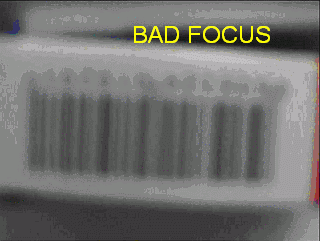
Turn Manual Focus ring near the lens to get desired focus:
BAD (adjust Manual Focus to get barcode focused):
GOOD (after Manual Focus ring adjustments):
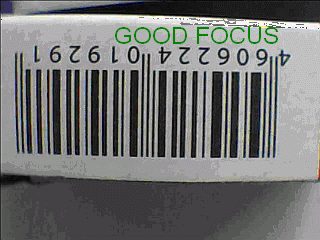
Now click Capture button and then Get Pictures button:
The image will be transferred to the BarCode Reader utility:
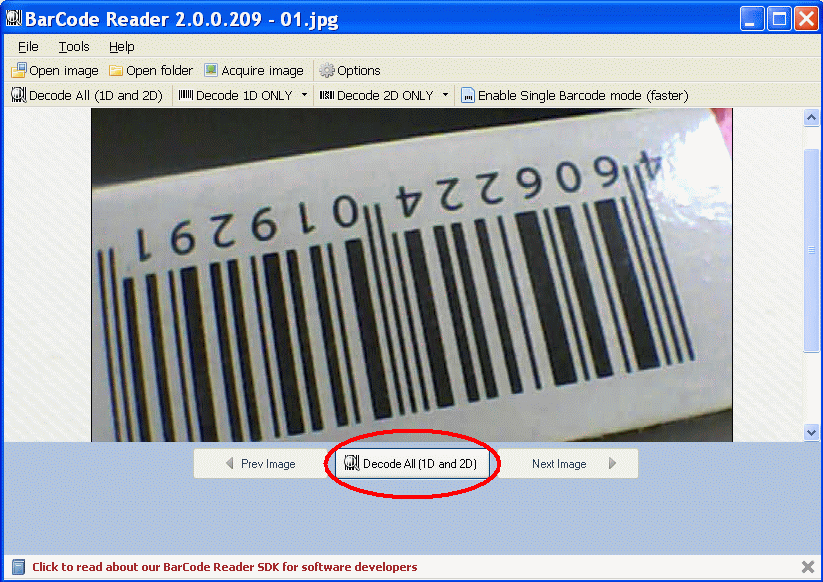
Click Decode All (1D and 2D) button to find and decode barcode:

You will see the utility found and decoded the barcode.
How to speed up decoding barcode images: you can speed up decoding by clicking Decode 1D only button or Decode 2D only button if you know the type of the barcode you have.
FOR SOFTWARE DEVELOPERS – here are the source code snippets to see how to scan and decode barcode from web camera (C# code):
/// <summary>
        /// Starts Asynchronous scan into images. When scan is finished
        /// then scan_TransferFinished event is called and array with
        /// images objects is passed into this event

        /// </summary>
        private void startScan()
        {
            // create new Scan object

            Scan scan = new Scan();

            // set Scan object to save images into images array
            // (will be passed as a parameter in scan_TransferFinished event

            scan.SaveTo = SaveTo.ImageObject;

            // set function for scan finished event to indicate when
            // image transfer is finished

            // see scan_TransferFinished event below
            scan.TransferFinished += scan_TransferFinished;

            // acquire images

            scan.AcquireImagesAsync(Handle);
        }


        // this event captures scanned images and fills images into tabs

        // you can also iterate through scannedImages array to get each
        // image as an Image object instead
        void scan_TransferFinished(Scan sender, ArrayList scannedImages)

        {
            List<string> files = new List<string>();

            for (int i = 0; i < Math.Min(scannedImages.Count, 1); i++)

            {
                Image image = scannedImages[i] as Image;

                string s = scannedImages[i] as string;

                if (image != null)
                {
                    string fileName = Path.GetTempFileName() + ".bmp";

                    image.Save(fileName);
                    m_filesToDelete.Add(fileName);

                    files.Add(fileName);
                }
                else if (s != null)

                    files.Add(s);
            }

            m_images = files.ToArray();

            m_currentImage = 0;

            updatePicture();
            updateButtons();

        }
private void decodeImage()
        {
            enableButtons(false);

            m_result = null;

SymbologyFilter filter = m_reader.TypeToFind;
if (m_reader != null)

  m_reader.ReadFrom(m_images[m_currentImage]);
}
            catch (Exception ex)

            {
                MessageBox.Show(ex.Message);
            }

            m_reader.TypeToFind = filter;
            m_lastDecodingTime = m_decodingForm.LastDecodingTime;

            updatePicture();

            updateFound();
            enableButtons(true);

        }