
How to convert FLA Flash movie into AVI video using Flash MX: step by step tutorial
IMPORTANT NOTE: this tutorial shows how you can convert FLA flash projects made in Flash MX into AVI video. If you need to convert SWF flash movie into video with sound please check this tutorial
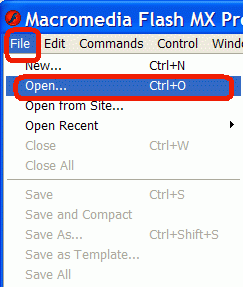
Start Flash MX. Now open FLA flash project using File menu as shown below:
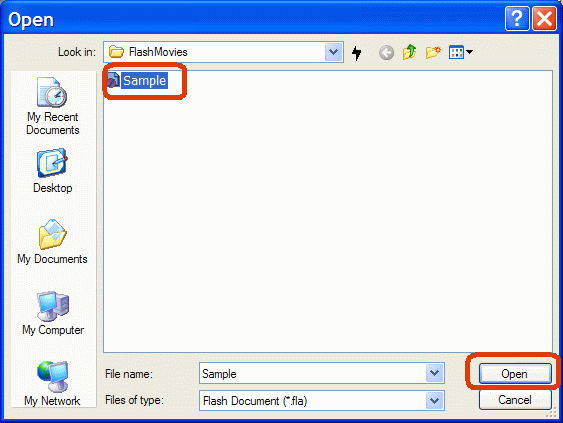
This will invoke Open Dialog. Select FLA flash document file and click Open button to open it:
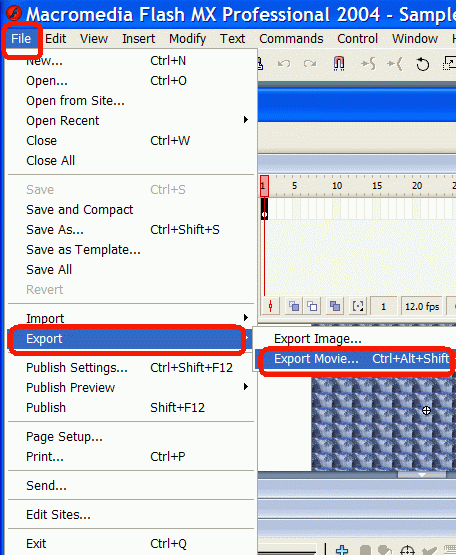
Flash MX will open Sample.FLA document. Now you should open File and select Export Movie command in Export sub-menu as shown below:
[an error occurred while processing this directive]
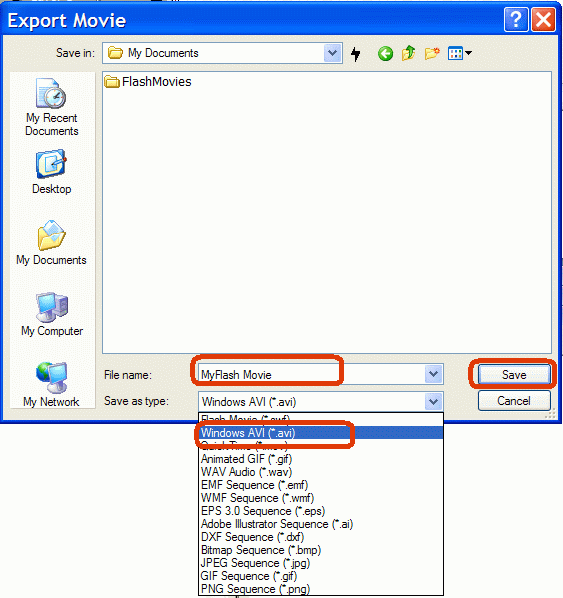
Save dialog will appear. Select AVI output file format as shown on screenshot below and click Save to save AVI video file:
That’s all!